
Batery Bet India App – Download and Mobile Access
Batery Bet India App gives Indian users access to betting and casino games through a mobile device. Baterybet supports Android downloads and browser entry for movement into betting sections, slots, and live-dealer tables. Indians who want betting and casino options in one place can explore the Batery Bet India App through a mobile browser or the Android application today.
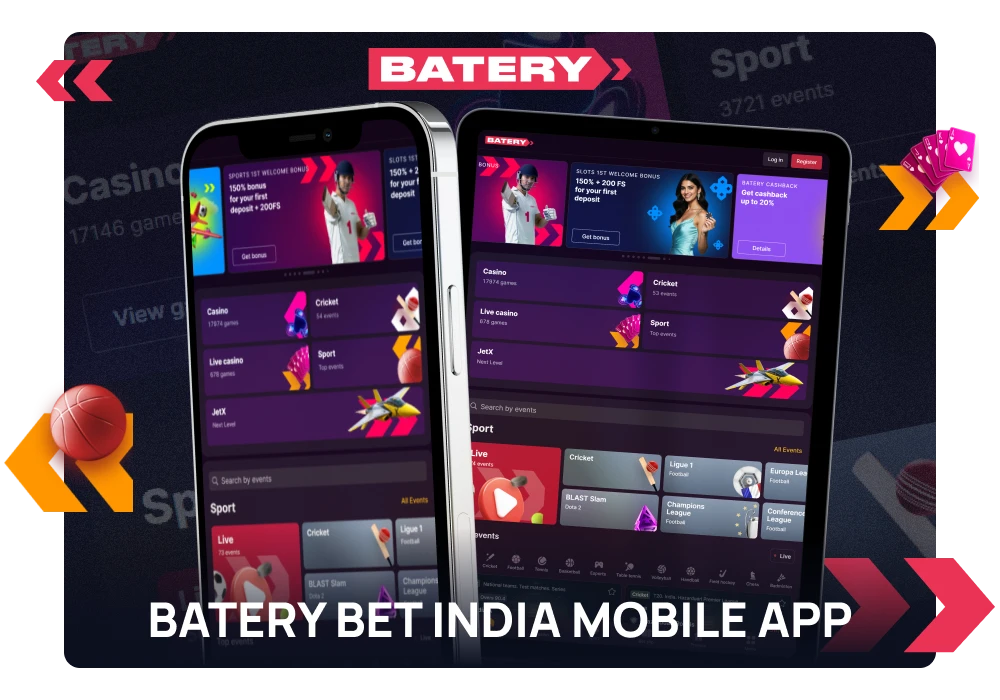
Batery Bet App – Mobile Features and Main Capabilities
Batery offers a mobile app where users access sports betting, casino games, account management tools, and payment options together. In India, the app supports deposits and withdrawals in INR.
Sports Betting and Live Cricket Tournaments
Batery Bet ensures this section functions on all devices. Users find five sports categories. They also choose from various tournament types.
- Cricket tournaments appear with top-level competitions and domestic series;
- Table tennis selections cover singles and doubles contests;
- Esports options include Counter-Strike and DOTA 2 tournaments;
- Odds display in decimal format next to each selection;
- Betting stays open ahead of and during each tournament;
- Quick movement between sports happens without a page reload.
Casino Games on Mobile
Indian players can download the Batery Bet mobile app, set up an account, and use it to play casino games and bet on sports.
- Slot games load quickly with classic and video reel formats;
- Live-dealer tables cover Roulette, Blackjack and Baccarat with real dealers;
- Free spins apply directly inside the casino section of the app;
- One balance covers both casino and betting activity without transfers;
- A single tap moves players between the casino and betting section.
Account Management and Navigation
In Batery Bet India, users access the account menu in just a few taps. The app places account settings within this menu, making them easy to find.
- Opening the menu. Tap the icon to view every account option;
- Checking balance. Select the tab to see available funds;
- Viewing bonuses. Open the rewards section to track current offers;
- Reviewing history. Tap past bets to check previous outcomes;
- Updating details. Open profile settings to edit contact information;
- Switching sections. Move between betting and casino without delay.
Notifications and Personal Settings
Baterybet sends users updates about bet results, bonus offers, and changes to deposits or withdrawals. Users can adjust these notifications in their account settings if they choose.
Batery Bet Android App – APK Download and Installation
Batery lets users download its Android app as an APK from the website. This article details how to download the app, lists supported devices, and explains how to update the app.
How to Download and Install the Batery APK
Preparing the Batery Bet APK for use on an Android phone involves steps. These steps are quick.
- Opening the website. Visit the official Batery Bet website;
- Starting the download. Tap the Android button to save the 50 MB file;
- Locating the file. Select the saved APK from notifications;
- Finishing installation. Tap install. Allow unknown sources in settings on request;
- Logging in or registering. Open the app and sign in or create an account.
Android System Requirements and Device Compatibility
Device compatibility affects Batery Bet India on Android phones. Most devices run Batery without lag, and users on compatible devices have access to casino and sports sections.
| Brand | OS Version | Notes |
|---|---|---|
| Samsung | Android 5 minimum | Basic functions run |
| Xiaomi | Android 8 or higher recommended | Smooth navigation |
| Realme | Android 8 or higher recommended | Mid-range handles app well |
| Vivo | Android 8 or higher recommended | Stable casino loading |
Enabling Installation from External Sources
To install apps from unknown sources on Android, adjust a specific setting. The process is quick.
- Opening Settings. Go to Security on the Android device;
- Allowing Unknown Apps. Turn on install permission for the browser;
- Disabling the Setting. Switch it off after the APK installs.
Automatic Updates and New App Versions
The Batery Bet India app sends update signals to Android devices. These updates help maintain consistent performance. Developers address issues reported by users in the account and casino sections.
- A new version triggers a prompt inside the app;
- Players can confirm the prompt and start the download without extra steps;
- The latest APK stays available for manual download on the official page;
- Downloading manually replaces an older build with the current version;
- Fresh updates fix bugs across account and casino sections;
- Performance on Android devices improves after each completed update.
Batery Bet for iOS – Installation on iPhone and iPad
People using iPhones or iPads access the Batery Bet mobile website. There is no confirmation of an iOS app.
How to Add Batery Bet to the iOS Home Screen
iPhone and iPad users can add an access icon to the main screen using Safari. After setting it up in the Share menu, the shortcut appears on the home screen.
- Safari open. Launch Safari on the device;
- Site entry. Enter the Batery Bet website address;
- Share tap. Select the Share icon below;
- Home screen add. Choose Add to Home Screen;
- Name confirm. Type Batery bet, then tap Add.
iOS System Requirements and Safari Compatibility
Users can open Batery Bet India on both iPhone and iPad. Access depends on the browser settings and the iOS version installed on the device. iOS supports various device generations and browsers that can load the site.
- iOS 15 or newer keeps Safari compatible with betting and casino pages;
- iPhone 8 and later devices load casino tables without lag;
- iPadOS 15 or higher displays betting lines inside Safari;
- Safari updates through iOS settings keep pages stable;
- No native iOS application download appears at this time.
Setting Up the Mobile Web Application
Batery Bet India users can open their accounts through a mobile browser without downloading an app. After logging in, they can add a shortcut to their account on the home screen.
- Opening the browser. Launch the mobile browser and visit the Batery Bet India website;
- Logging in. Enter the registered phone number and password on the login form;
- Saving credentials. Select the browser prompt to store login details for future visits;
- Adding the shortcut. Open the browser menu and choose add to home screen;
- Launching the shortcut. Tap the saved icon for app-style access on the device.
Automatic Updates and Version Synchronisation
Baterybet's site always opens with the latest version. Each page displays updated odds, betting options, and casino games when loaded. iOS users do not have to perform manual updates.
Batery Mobile App Registration and Account Access
People can use their phones to sign up or log in to Batery bet and Batery bet India. The process includes steps for login recovery and KYC verification.
Creating a New Account Through the App
Anyone who signs up for the Batery Bet India app can use the betting and casino sections.
- Opening the app. Go to the Batery Bet India site;
- Tapping sign up. Select the sign-up button;
- Selecting the country. Choose India from the list;
- Choosing INR. Set INR as the currency;
- Entering contacts. Add an email and phone number;
- Setting a password. Create and confirm a password;
- Accepting terms. Agree to the terms and confirm age;
- Verifying details. Complete verification upon request.
Batery Bet Login and Password Recovery
People enter Batery Bet India by filling out a login form. If someone forgets their details, they can use the password recovery option to regain access.
- Open the login form from the home page;
- Enter the registered email or phone number;
- Add the account password for entry;
- Enable PIN access, where offered, for faster entry;
- Trigger password recovery via email or SMS after forgotten credentials.
Account Verification and KYC Requirements
Users must complete identity and address verification before larger withdrawals on Batery Bet India. The site requests a photo ID and proof of address for verification. Requirements for verification may change over time, so users should review their account area for the latest information.
Batery Bet App for Sports Betting and Live Events
Batery provides five sports betting categories in India, accessible through the Batery Bet app, allowing users to place bets on daily or ongoing events at any time they wish.
- Early tournaments and in-play choices appear;
- Cricket keeps a dedicated category for domestic and international fixtures year-round;
- A bet slip holds selected picks;
- Decimal and fractional odds display inside personal account settings;
- Live updates refresh scores and selections instantly.
Batery Casino App – Slots, Aviator and Live Dealer Games
At Batery bet, Indian players can log in and play slots, crash games like Aviator or JetX, or dealer tables. Pragmatic Play and Evolution provide the casino's games. New players can claim a welcome package with up to ₹150,000 and 430 spins on the first five deposits. Players should read all the bonus terms before claiming the offer. The casino gives the bonus after players meet the required conditions.
Batery Bet Mobile Payments – Deposits and Withdrawals
Processing times vary depending on the channel. They can take as little as fifteen minutes or as long as seventy-two hours. Batery Bet assigns specific limits to each channel. To view the available options, go to the payment section in the cashier.
Adding Funds Through the Mobile App
The Batery Bet India App lets users add money from their phone. Players can pick from several payment methods. Each method has a different minimum amount and processing time, so users can find the option that fits.
| Method | Typical Min Deposit | Notes |
|---|---|---|
| UPI | ₹100 | Instant transfer from linked bank apps |
| Paytm / PhonePe | ₹200 | Wallet balance required for transfer |
| NetBanking / Cards | ₹300 | Debit and credit cards accepted |
| Crypto | ₹300 | Separate crypto gateway processes payment |
Batery App Performance, Security and Troubleshooting
The Android app requires about 50 MB of storage. Load times depend on the specific device and the type of connection used.
App Loading Speed and Internet Connection
The Batery Bet India App can load or not, depending on network strength and device settings. Users can adjust their settings to reduce buffering, page delays, and wait times when moving between betting and casino sections.
- Stable connection: Use a steady 4G or Wi-Fi signal for login;
- Background apps: Close unused apps to free memory on the device;
- Cache clearance: Remove the app cache inside system settings every week;
- Browser fallback: Open the mobile site through a browser during slow app performance;
- Storage check: Delete unused files to keep storage space available.
Common Installation and Login Problems
Indian users sometimes run into installation or login issues with the Baterybet app. Most setup problems stop after a few steps.
- Check storage. Free space and match the Android version for the APK installation;
- Enable unknown sources. Allow installation from unknown sources in settings;
- Verify login details. Enter the correct email and password;
- Update the app. Install the latest build to avoid server conflicts.
Resolving App Crashes and Compatibility Issues
Restarting Baterybet can resolve crashes. If issues persist, reinstalling the APK file may remove any leftover data. Users who access Baterybet through a browser can try updating the browser to check for improvement. If these steps do not help, contacting support is recommended. Providing handset details, OS version, and screenshots allows the support team to identify the problem.
Frequently Asked Questions
Who can register with the Batery Bet India app?
Anyone in India who is eighteen or older can sign up. During registration, they can choose INR as their account currency.
How does login work inside the app?
Users sign in with their email or phone number and password. Inside the app, they can also set up a PIN.
Is the Android application available for download?
Android 5.0 or later is required. The Android APK takes up around 50 MB of storage.
Can iPhone and iPad users access the app?
iPhone and iPad users access a mobile site using their browser. The mobile site includes web app functions.
Which sports and esports appear in the app?
The sports section includes cricket and table tennis. Esports features Counter-Strike and DOTA 2.
What casino options appear in the app?
Users can access slots, casino games, and live-dealer tables with a single account. The site includes a section dedicated to free spins offers.
What welcome offer applies to new accounts?
Players receive up to ₹150,000 and 430 spins across their first five deposits. The promotional pages display this information.
What payment methods fund an INR account?
Payment tables include options like UPI, Paytm, and PhonePe. They also show IMPS, NetBanking, debit cards, credit cards, and cryptocurrency.